TypeAeroScan-to-Use Wireless Phone Keyboard and Voice Typing Software for PC
Turn your phone into a wireless smart keyboard.
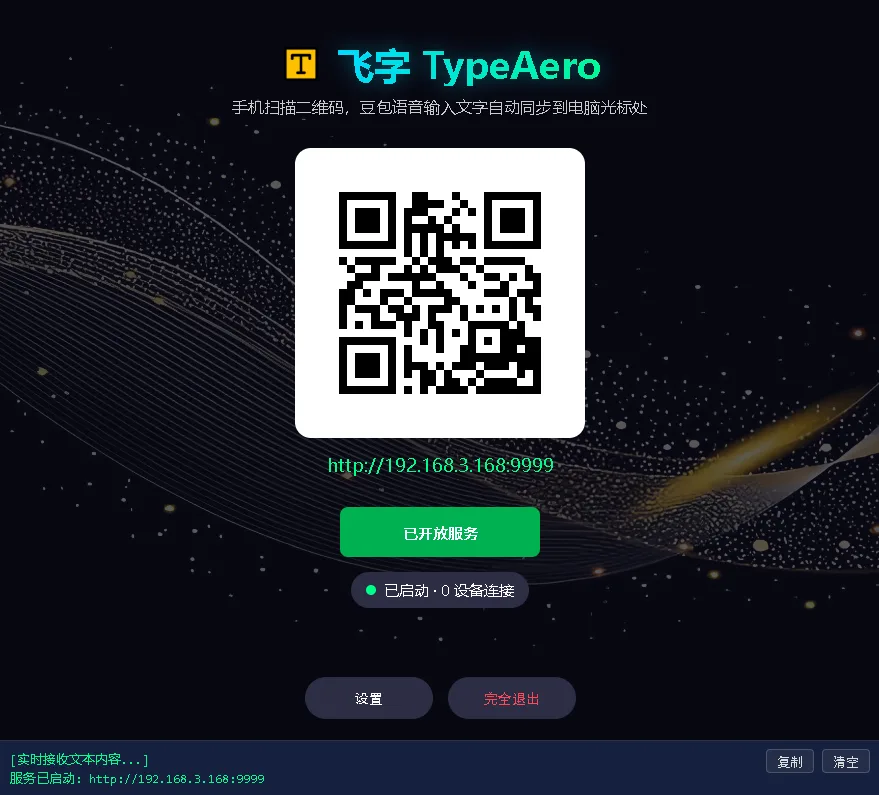
Scan to use, voice typing, 5-10x typing speed.
Offline version: 0 token, high-precision voice typing without paying for AI models
Core Feature Highlights of TypeAero Wireless Keyboard
Free Your Hands, Boost Speed 5-10x
Say goodbye to sore hands. We highly recommend using top-tier AI voice keyboards (like iOS/Google Native Dictation or Gboard). Speak into your phone and watch it instantly turn into text on your PC. Experience unprecedented typing speed.
Learn moreZero hardware cost. Your phone is the magic.
No need to buy a voice mouse or microphone. Use your existing phone, save money and desk space. No cloud LLM integration required, zero token consumption, completely say goodbye to API billing anxiety.
Learn moreScan to use. No APP required.
Pure Web driven. Just scan the QR code with your native Camera or QR scanner app to open the input panel. No app installation required.
Perfectly compatible with all mainstream voice keyboards.
Exclusive smart backspace protocol. Whether you use Gboard, iOS Dictation, or Doubao (if available in your region), when the AI auto-corrects a whole sentence, the PC accurately deletes and rewrites without any garbled text.
Typing becomes shortcuts.
Type specific words on your phone, and the PC instantly converts them into shortcuts. Ctrl+S, Enter, fully customizable.
LAN direct connection. Absolute privacy.
Data only flows between your phone and PC. No cloud servers involved, ensuring zero business secret leaks.
Product Showcase


Frequently Asked Questions
How to resolve LAN connection issues?
Ensure your phone and PC are connected to the same Wi-Fi. Also check that your Windows network profile is set to Private. If it still fails, open PowerShell as Admin and run New-NetFirewallRule -DisplayName 'Allow Port 9999' -Direction Inbound -LocalPort 9999 -Protocol TCP -Action Allow. 👉 Read the full troubleshooting guide
Which voice input keyboards are supported?
Perfectly compatible with mainstream mobile keyboards, including iOS, Android, and Huawei built-in voice typing, as well as Gboard and top-tier AI voice apps. TypeAero's exclusive smart backspace protocol ensures that when these keyboards auto-correct, the PC automatically syncs to delete and rewrite accurately, without garbled text.
Can I use it on an Apple Mac?
Currently, TypeAero only supports Windows 10/11 x64 systems. The macOS version is under active development, please stay tuned!
Do I need to download an App on my phone?
Absolutely not! TypeAero is driven entirely by web technologies. Just open your camera or any QR scanner to scan the code on your PC screen, and the input panel will open directly in your mobile browser, taking up zero storage space on your phone.